

Your teacher said, “Just finish your XtraMath.” Now a countdown timer is staring you down. Maybe you’re a parent stuck on a sign-in screen at 8:45 on a school night. Or maybe you saw a meme about “the XtraMath guy” and tumbled down a rabbit hole.
This XtraMath explained guide answers the questions that keep popping up. You’ll learn how the program works, how to log in, who Mr. C really is, what it costs, and whether it deserves a spot in your routine. Think of it as XtraMath explained without the hype or the horror stories. Whether you’re a student, a parent, or a teacher, XtraMath explained in plain English starts right here.
Quick Answer: XtraMath explained in 30 seconds:
- It’s a free nonprofit web program that builds basic math fact fluency for kindergarten through eighth grade.
- Students sign in with their name, the parent or teacher email on the account, and a 4-digit PIN. Sessions take about 10 minutes.
- Paid Pro plans add extra controls. XtraMath explained in one line: fast flashcard practice, not a full math course.
1. What Is XtraMath and What Does It Actually Teach?
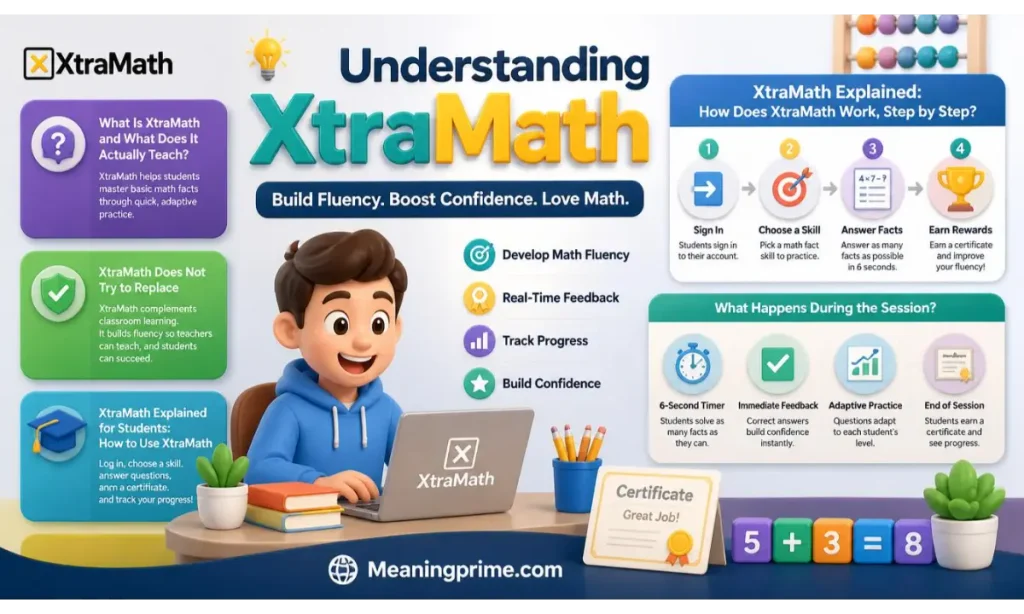
XtraMath is an online program for practicing basic math facts. It covers addition, subtraction, multiplication, and division. Here’s XtraMath explained in two words: fact fluency. That means answering 7 × 8 with “56” instantly instead of counting on your fingers.
David Jeschke started the program in 2007. He was tutoring Seattle elementary students who still counted on their fingers. XtraMath became a formal nonprofit in 2009 and now serves students in kindergarten through eighth grade.
Why does speed matter? When facts come automatically, your brain has room left for fractions, equations, and word problems. Typing works the same way. Once you stop hunting for each letter, you can focus on what you’re actually saying.
Parents get a simple deal. XtraMath explained at home means a few minutes of daily practice for your child and a progress report for you. You don’t grade anything. You check the numbers and cheer on the effort.
What XtraMath Does Not Try to Replace
XtraMath is supplemental. It drills facts. It doesn’t explain why 36 ÷ 6 equals 6. A teacher, a parent, or a set of counters has to cover that first. XtraMath’s own help pages agree. Students should feel comfortable solving problems without a clock before they start.
That gap explains the mixed opinions. A child who already understands division may enjoy the quick practice. A child who’s still puzzled may feel quizzed on a language nobody has taught yet. For anyone new to this tool, XtraMath explained fairly means seeing it as a practice partner and never as the lesson itself.
XtraMath Explained: How Does XtraMath Work, Step by Step?
Picture smart flashcards. XtraMath uses spaced repetition. Facts you miss return sooner. Facts you know return later. Here’s the usual path:
- Placement. New students take short placement quizzes spread across their first few sessions. Mr. C introduces the program in brief videos.
- Starting score. XtraMath sets an initial fluency score. Most students begin with addition.
- Daily progress quiz. Every sign-in opens with a two-minute check on how things are going.
- Targeted practice. The program picks an individualized set of 10 facts to work on.
- Rewards. Students earn trophies for milestones and certificates for finishing an operation.
Students tackle one operation at a time. Addition comes first for most kids. How long each operation takes depends on practice habits. XtraMath says anywhere from several weeks to a few months is normal.
What Happens During the Session?
A session runs about 10 minutes or less and is built for once a day. Each activity lasts roughly two minutes. An animated timer shows how long you have for each question. Get a fact right and fast. It moves toward mastered. Miss it and it returns soon. That’s XtraMath explained at its simplest: repetition with a purpose.
XtraMath Explained for Students: How to Use XtraMath
New to the program? Follow this quick routine:
- Open the Student Sign In page. Skip the teacher login.
- Type your name exactly as your adult set it up.
- Add the parent or teacher email on the account, then your 4-digit PIN.
- Finish your daily session. Aim for accuracy first and speed second.
- Check your trophies. They tell the real story of your progress.
Feeling nervous at first? Everybody does. XtraMath explained for kids comes down to one idea. Calm, accurate answers beat rushed guesses every time.
2. How Do You Log In to XtraMath as a Student?
Most “XtraMath login” searches come from a kid or a parent stuck at the same screen. The good news is simple. Student sign-in needs just three pieces of information. Here’s XtraMath explained for logins in a single glance.
What You Need for Student Sign In
| Field | What to enter | Common slip-up |
|---|---|---|
| Name | The student’s name exactly as XtraMath stores it | Using a nickname or skipping a last initial |
| The parent or teacher email linked to the account | Typing the student’s own email | |
| PIN | The student’s 4-digit PIN | Treating it like a long password |
XtraMath doesn’t use student email addresses for this step. The email belongs to the adult who created the account. Suppose the account lists “Emma R.” Typing only “Emma” can trigger an error. In other words, XtraMath explained for sign-in comes down to matching the account word for word.
Parents, here’s a shortcut. Your own XtraMath account shows each child’s report. The report lists the exact name and the current PIN.
Can Students Use Google, Clever, or ClassLink?
Often, yes. Google, Clever, and ClassLink all work where a school or family has set them up. Clever and ClassLink plug into school rostering. Google sign-in may ask for the student’s XtraMath details the first time. After that, it usually saves a step.
What If You Are Signing In at Home?
XtraMath explained for home use is simple. Students use the regular Student Sign In page from any computer or tablet. A family account also lets a parent open the student’s report and start a session. On a private device, the “Remember me” option speeds up future sign-ins. Skip it on a shared or public computer. Otherwise the next person could land in your child’s account.
3. Why Is XtraMath Student Login Not Working?
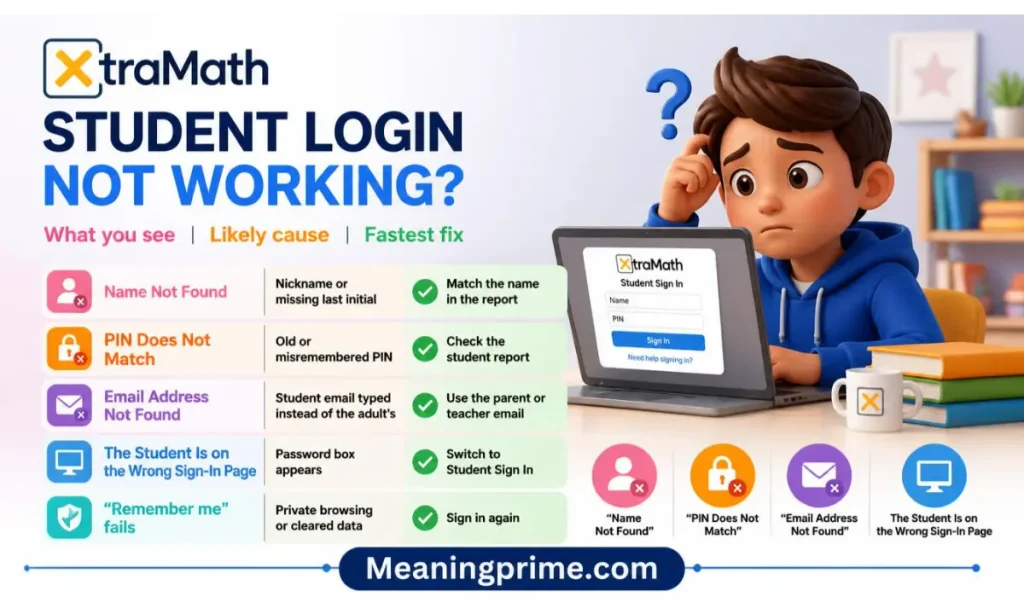
Before you assume the account is broken, take a breath. Most failures trace back to one wrong detail. Here’s XtraMath explained for troubleshooting, starting with the quick-reference table below.
| What you see | Likely cause | Fastest fix |
|---|---|---|
| “Name not found” | Nickname or missing last initial | Match the name in the report |
| “PIN does not match” | Old or misremembered PIN | Check the student report |
| “Email address not found” | Student email typed instead of the adult’s | Use the parent or teacher email |
| Password box appears | Wrong sign-in page | Switch to Student Sign In |
| “Remember me” fails | Private browsing or cleared data | Sign in again |
Now the details behind each one.
“Name Not Found”
Check spelling first. The name has to match what’s stored in XtraMath. A missing last initial or a nickname is the classic culprit. Ask the teacher or parent who created the account to confirm the exact version.
“PIN Does Not Match”
The student may be using an old or misremembered PIN. A parent or teacher can open the student’s report and read the current 4-digit number. A recovery option through the linked family email also exists.
“Email Address Not Found”
Look at which address you typed. Kids often enter their own school email. XtraMath wants the parent or teacher email attached to the account instead. Also scan for typos. One swapped letter is enough to fail.
The Student Is on the Wrong Sign-In Page
Students need the Student Sign In page. Parents and teachers use their own sign-in. A password box is a clue. If your child is typing a PIN into a password field, they’ve landed on the wrong door.
The Sign-In Page Does Not Remember the Student
When “Remember me” stops working, blame the browser. Private windows and school settings that wipe browser data can erase what the page saved. The account itself is probably fine. You’ll just sign in again.
Still stuck? Try XtraMath’s own basics. Refresh the page, then do a hard refresh (Ctrl+Shift+R on Windows or Command+Shift+R on a Mac). Check that other websites load. Make sure xtramath.org isn’t blocked by a firewall or parental controls. As a last resort, switch browsers. Following this XtraMath explained checklist solves a surprising number of “it’s broken” panics.
4. Who Is the XtraMath Guy, and Who Is Mr. C?
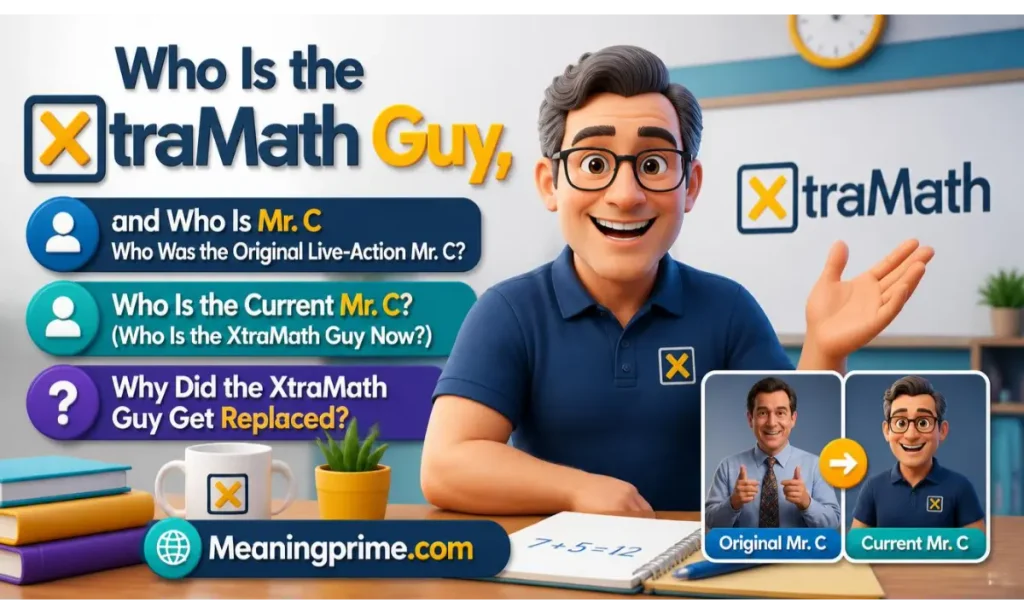
Students meet Mr. C the moment they start. Internet users know him as “the XtraMath guy.” The confusion begins because three different things share that label: a live-action teacher, an animated coach, and the program’s founder. XtraMath explained for curious minds starts by untangling them.
Who Was the Original Live-Action Mr. C?
He was a real teacher on video. A live-action Mr. C served as the friendly face of XtraMath starting in 2012. Common Sense Education describes him as a National Board Certified teacher from Seattle. XtraMath’s official account posted about his real-life identity back in November 2017. When the company introduced the animated version, it gave special thanks to “Chris, the original Mr. C,” for his contributions.
Who Is the Current Mr. C? (Who Is the XtraMath Guy Now?)
XtraMath explained today means an animated math coach named Mr. C. XtraMath introduced him in 2023. He greets students, guides each daily session, and highlights progress. Students don’t compete against him or against classmates. They chase their own personal best. So when someone asks about “the XtraMath guy now,” the answer is a character and not a person on camera.
Here’s a quick way to tell which Mr. C you’re looking at. A real person speaking to the camera means the older live-action footage. A cartoon coach means the 2023 redesign. That’s XtraMath explained for anyone comparing old screenshots with new ones.
Why Did the XtraMath Guy Get Replaced?
XtraMath’s stated reasons are practical. The company wanted a character that fosters a growth mindset and reduces math anxiety. An animated coach can also adapt to each student’s practice instead of repeating the same recorded lines. XtraMath hasn’t described any dispute behind the change. The new design aims to calm nerves, which matters to kids who found the old videos intense.
What Happened to the XtraMath Guy?
Mostly, he became a meme. Here’s the timeline:
| Date | What happened |
|---|---|
| 2012 | Live-action Mr. C becomes XtraMath’s on-screen teacher |
| Nov 9, 2017 | Official XtraMath account posts about Mr. C’s real-life identity |
| Mar 2, 2019 | A YouTube video titled “Welcome to Xtramath” becomes the earliest known meme |
| Oct 21, 2019 | eBaum’s World publishes a list of XtraMath memes |
| Nov 19, 2019 | A Reddit post titled “You failed the Xtramath vibe check” collects nearly 200 upvotes |
| May 12, 2020 | A compilation of Mr. C videos and a parody TikTok account appear |
| 2023 | XtraMath introduces the animated Mr. C |
The jokes target the camera stare and the ticking clock. They don’t target math itself.
Where Can You Watch the XtraMath Videos on YouTube?
XtraMath runs an official YouTube channel called XtraMath_USA. Fan-made compilations of the old Mr. C footage live elsewhere on the platform. Those compilations are entertaining. They’re no substitute for the real program. For help with setup or sign-in, stick with official uploads. That keeps XtraMath explained accurately instead of through jokes alone.
5. Who Created XtraMath, and Does It Still Exist?
Who Created XtraMath?
XtraMath explained at its roots: David Jeschke, a former Microsoft programmer, created it. He built the original program himself while volunteering as a math tutor. Seeing kids who still counted on their fingers, he recognized the need for individualized math fact practice.
When Was XtraMath Made?
The program began in 2007. It became a nonprofit in 2009. Today the organization is a 501(c)(3) based in Seattle. Donations and grants help keep the core program free, which is why XtraMath explained as a “free nonprofit tool” holds up.
Does XtraMath Still Exist?
Yes. XtraMath explained as a living nonprofit means steady updates, including new program settings, a direct link to its Awakening game portal, and blog posts as recent as August 2026. Its 2026–27 pricing sheet is already out. Its teacher page reports more than 6.2 million students and 575,000 teachers last school year. If you can’t find the old app, that’s a separate matter. See the phone section below.
Did the XtraMath Guy Die?
The phrase “XtraMath guy” muddies this one. Separate the people.
| Who | Role | Status |
|---|---|---|
| David Jeschke | Founder | XtraMath announced his passing in December 2024 |
| Chris | Original live-action Mr. C | Thanked in XtraMath’s 2023 announcement, with no announcement of his death |
| Current Mr. C | Animated math coach | A character, not a person |
Jeschke had stepped back in 2024 and held the title Founder Emeritus. The switch from live-action to animation is not an obituary. XtraMath explained that change as a character redesign.
6. How Do Teachers and Parents Use XtraMath, and Does It Work on a Phone?
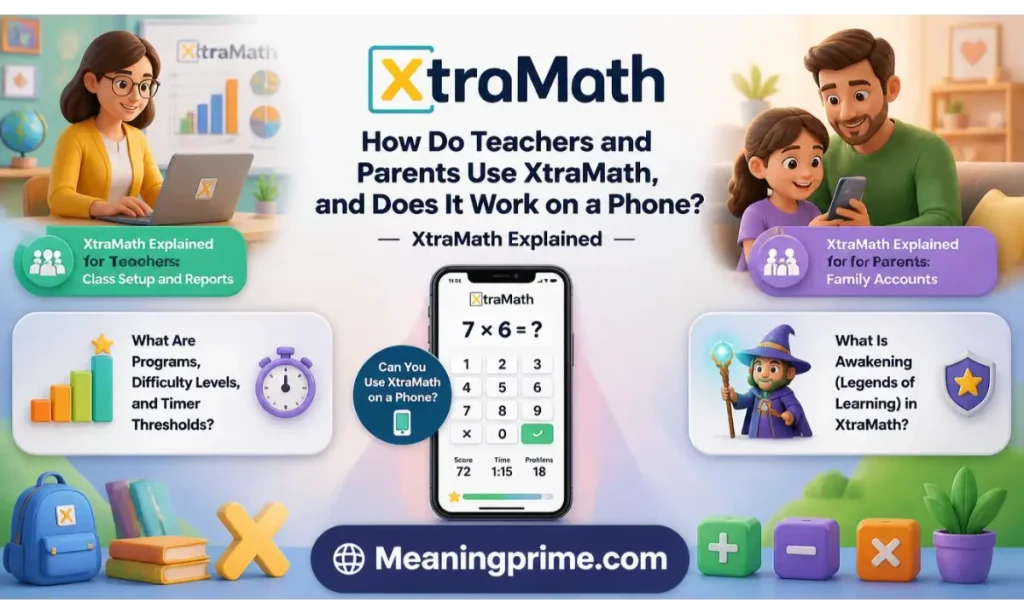
XtraMath Explained for Teachers: Class Setup and Reports
Setting up a class takes minutes. Create a teacher account, add a class, and choose Add Students from the class report. Each student gets a PIN. You can set unique ones or accept random picks. Schools using Clever can install XtraMath there and let rosters build themselves. Uploading a roster file manually requires a paid license.
New students receive a default program based on grade level. Reports arrive in three flavors: student, class, and date. A weekly email can deliver a PDF version. One device shared by a whole class also works, since students take turns.
XtraMath Explained for Parents: Family Accounts
Families create a free account and add their children. Each child gets a PIN. Parents receive progress reports by email and can open fuller reports online any time. Homeschoolers often use XtraMath as a daily warm-up before the main lesson. The Family Pro plan costs a few dollars a year and unlocks more customization.
What Are Programs, Difficulty Levels, and Timer Thresholds?
A program decides which operations a student practices. A difficulty level decides which facts appear. Three problem sets exist: Beginning, Regular, and Expanded. Beginning starts with sums up to 10. The timer threshold sets how long a student gets per answer: 12, 6, or 3 seconds.
XtraMath suggests pairing Beginning with the 12-second threshold for young learners. For Regular, try 6 seconds first. Then repeat the same operations at 3 seconds to build true fluency. Teachers can also hide the timer for a student who freezes under pressure. Free accounts get limited customization. Pro plans unlock the full set.
What Is Awakening (Legends of Learning) in XtraMath?
Awakening is an optional game world from Legends of Learning. XtraMath added it in 2025. Students reach it only after finishing the daily session, and only if a teacher or parent switched it on. Rewards earned through practice let kids customize avatars. Adults can toggle it for one student or an entire class. It’s free for all XtraMath users.
Can You Use XtraMath on a Phone?
XtraMath explained for phones is easy. Open the XtraMath website in your phone’s browser. Older articles mention standalone apps. At least one app review site now lists XtraMath’s as no longer available. That’s why you shouldn’t trust random APK download sites claiming to offer “the official app.” Check XtraMath’s support pages before installing anything. The real website works on any phone, tablet, or computer.
7. Why Do Some Students Hate XtraMath, and Is It Actually Good for Learning Math?
Open any review site and you’ll see two different worlds. SmartCustomer shows an average of 1.4 out of 5 across 41 reviews, mostly from kids venting about speed. Common Sense Education calls the program free and effective but not much fun. Both can be true.
Is XtraMath Good or Bad? The Short Answer
It depends on the child. For building quick recall of facts the student already understands, it does its job. As a teacher of new ideas, it falls short. XtraMath explained fairly is a sturdy drill tool with a strict clock.
Why Do People Make XtraMath Memes?
XtraMath explained through memes is really about shared memory. Millions of kids lived the same routine. A ticking timer. A serious face on screen. Daily repetition. Nobody posts a meme to prove the math fails. They post because the experience feels oddly universal. Laughing about the timer doesn’t mean the practice is useless.
What Does XtraMath Do Differently?
XtraMath explained by its design comes down to three things.
- Individualized facts. The program chooses what each student needs instead of handing everyone the same worksheet.
- Spaced repetition. Missed facts come back at smart intervals.
- Short sessions with clear reports. Ten minutes a day, no ads, plus progress data for adults.
Not everyone’s impressed. Rocket Math, which sells a competing math facts program, points out that Mr. C’s encouragement stays the same no matter how you perform. Reviewers at Brighterly also mention typos that cost students points and a lack of flashy rewards.
XtraMath Pros and Cons
| Pros | Cons |
|---|---|
| Core program is free | Timer pressure upsets some kids |
| Adapts to each student | Teaches no concepts, only recall |
| Short daily sessions | Repetitive by design |
| Reports for parents and teachers | Little motivation beyond trophies and the optional game |
| Adjustable timer settings | Free accounts limit customization |
What Should You Understand About XtraMath Before Judging It?
Ask what job you’re hiring it for. If the job is fact recall, it’s a reasonable fit. If the job is understanding, pair it with a real lesson. Reviewers at The Learning Standard compare it to digital flashcards rather than a tutor. That framing helps. Nobody blames flashcards for failing to explain a concept. Judged by that standard, XtraMath explained honestly earns a respectable grade.
8. How Do You Pass a Level in XtraMath, and How Can You Make It Less Stressful?
How Do You Pass a Level in XtraMath?
Levels here mean operations. XtraMath marks an operation complete when a student reaches a fluency score of 100. At that point the fluency matrix on the student’s report turns fully green. That score isn’t the same as getting 100 percent on one quiz. It measures fluency across all the facts and weighs the last few days of results.
So how do you get there?
- Practice every day. Consistency beats long, tiring sessions.
- Answer accurately before you chase speed.
- Type carefully. Parents report typos as a common frustration.
- Keep working on the facts that keep returning. They’re the ones that need attention.
Adults can move a student ahead manually. XtraMath doesn’t usually recommend skipping. It makes sense only when frustration has become so high that the child stops trying. Check with the teacher first when school assigned the program. That’s XtraMath explained for anyone chasing a green matrix.
How to Make XtraMath Less Stressful for Your Child
Start by finding the real culprit. Is it the timer? The operation? Boredom? Then adjust.
- Ask the adult account holder to hide the timer or choose the 12-second threshold.
- Practice stubborn facts away from the screen. Cards and spoken drills work well.
- Keep sessions short and consistent. Stop at ten minutes.
- Praise effort and progress, not speed alone.
- Watch trophies and fluency growth instead of single-day scores.
Try a simple two-week experiment. In week one, hide the timer and practice at the same hour each day. In week two, look at the report together. Point out one fact that improved. XtraMath explained for anxious kids works best when progress feels visible. Slow answers aren’t failure. They’re data.
Can You Cheat on XtraMath?
Some students search for shortcuts. XtraMath explained honestly says cheating backfires. XtraMath adapts to the answers it sees. Borrowed answers give it a false picture. Practice then lands in the wrong place. Reports also show accuracy and speed to the adults in charge. A better move? Ask for a longer timer, learn a few tricky facts offline, then return.
9. How Much Does XtraMath Cost, and Is It Safe and Worth Choosing?
How Much Does XtraMath Cost? Is XtraMath Free?
Yes, the core program is free. XtraMath’s 2026–27 pricing sheet lists a free Standard plan alongside paid Pro options. XtraMath explained on cost comes down to one question: do you need the extra controls?
| Plan | Price | Best for | What it adds |
|---|---|---|---|
| Standard | $0 | Families and teachers | Automated reports, Awakening option, Clever and ClassLink access, limited customization |
| Family Pro | $6 per year | Home use | Full program customization, student brief, priority support, 3 students included |
| Teacher Pro | $79 per year (the $50 promo ended Oct 1, 2026) | One classroom | 50 students, classroom brief, placement quiz option, printable activities |
| School Pro | $2 per student per year | Schools and districts | Unlimited accounts, Clever SecureSync, monthly and weekly reports |
Extra students on Pro plans cost $2 each. Prices change. Confirm them on XtraMath’s pricing page before buying.
Who should pay? Most families don’t need to. The free plan covers daily practice and reports. Pay only if your child needs custom timer settings or a program built around specific operations.
Is XtraMath Safe for Students?
XtraMath is built for children and schools. The company states that it follows COPPA and FERPA and doesn’t sell or share student data with third parties. It also reports meeting WCAG 2.1 AA accessibility standards. The program shows no advertising to students. Awakening games stay off until an adult enables them. Still, use normal caution. Make sure you’re on the real XtraMath website. Avoid copycat pages that ask for student details. Safety is a big part of XtraMath explained for parents.
XtraMath vs Other Math Learning Tools
| Tool | Best for | Cost model |
|---|---|---|
| XtraMath | Speed and accuracy with basic facts | Free core, optional Pro |
| Khan Academy | Lessons across many math topics | Free |
| IXL | Skill-by-skill practice across grades | Subscription |
| Reflex | Game-based fact fluency | Subscription |
XtraMath explained next to rivals is simple. If your child needs fact recall, it fits. If your child needs explanations first, start with lessons and add XtraMath later.
What Should Parents and Students Know Before Using XtraMath?
Here’s XtraMath explained as a problem-and-fix list:
- Login trouble: Check the exact name, linked adult email, and PIN.
- Timer stress: Hide the timer or pick a longer threshold.
- Confusion about concepts: Teach the idea first. Use XtraMath for practice.
- Missing app: Open the website in a mobile browser.
- Mr. C questions: Remember the three separate identities.
- Boredom: Try the optional Awakening game if an adult enables it.
Frequently Asked Questions
How does XtraMath work?
XtraMath gives students a short daily session of quizzes and targeted practice on facts chosen for them. It uses spaced repetition. Missed facts return sooner. XtraMath explained simply: smart flashcards with a timer.
Is XtraMath good or bad?
It’s good at building fast recall of basic facts and weak at teaching concepts. Kids who dislike timers may find it stressful. XtraMath explained for those kids includes adjustable timer settings that adults can change.
Why did the XtraMath guy get replaced?
XtraMath says the animated Mr. C better supports a growth mindset and reduces math anxiety. The live-action Mr. C had been the face of the program since 2012.
Does XtraMath still exist?
Yes. XtraMath explained today means an active nonprofit with regular updates and a published 2026–27 price list.
Is XtraMath free?
XtraMath explained on cost: the core Standard plan is free. Paid Pro plans start at $6 per year for families.
Conclusion
XtraMath is a focused fact-practice tool and not a complete math teacher. For kids who understand the concepts and need quicker recall, it’s a smart, free, low-effort habit. For kids who need explanations or struggle with time pressure, it works best with a gentler timer and plenty of support.
Match the tool to the problem. That’s XtraMath explained in one sentence. Fix the login with the right name, email, and PIN. Loosen the timer when stress spikes. And if you only came for the Mr. C story: the live-action teacher gave way to an animated coach, while the founder passed away in December 2024. XtraMath explained, in the end, is simple. Short daily practice builds skill. Pressure alone doesn’t.